School Bus Attendance
The PRSD uses a bus card system across all of our bus routes.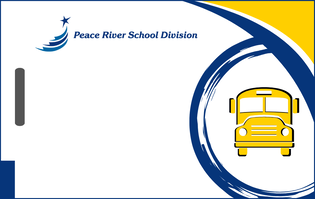 This system is designed for improved safety and efficiency of student transportation.
To provide parents with additional peace of mind regarding their child's safety while riding the school bus, the bus card system is paired with a dedicated parent app called Chipmunk. Chipmunk provides real-time information and enhanced communication regarding your child's bus ride to and from school. Please scroll to the bottom of this page for FAQs regarding Chipmunk, or visit the Chipmunk website HERE.
How the System Works
The bus cards are a crucial part of our bus attendance procedure. They contain only the student's name and a system-readable number. Please be assured that no other personal or identifying information is stored on the card itself.
Students are required to scan their card using the card reader installed on their bus when they get on and off the bus. This simple action allows us to achieve several vital safety and operational goals:
- Increased Driver Focus: By automating attendance, drivers can remain focused on the road and the safe operation of the bus, removing the distraction of manually logging students.
- Enhanced Safety: The system ensures students get on and off at the correct bus stop and school. It will instantly alert the driver if a student attempts to scan in or out at an incorrect stop.
- Support for Spare Drivers: The system provides spare drivers with turn-by-turn directions to every stop and an accurate, automated attendance process. This is particularly helpful when a space driver may not personally know each child.
FAQs
What is a Bus Attendance Card?
The PRSD Bus Attendance Card is an ID card that contains your child's name and a number that is only readable by our attendance system. It helps us take attendance quickly and safely as students get on and off the bus.
Why do we need to use a bus pass?
The bus attendance cards provide an improved, secure, and reliable way for students to board and exit the bus, automatically recording student attendance, allowing drivers to focus their attention fully on the safe loading and unloading of students.
In the rare event a child gets off at the wrong stop, the card record allows our staff to immediately confirm where they exited, focusing search efforts instantly and reducing critical response time.
The cards also help both regular and spare drivers ensure every student boards the correct bus and exits at their assigned, correct stop.
What is my responsibility as a parent?
You are responsible for making sure your child has their Bus Attendance Card every day they ride the bus. We recommend attaching it to a strong badge reel. The cards are readable through phone wallet attachments, and other card protection sleeves.
What if my child forgets their attendance card?
If a student occasionally forgets their attendance card, they will still be able to ride the bus as our drivers do have the ability to manually record attendance, if required. To help students keep track of their attendance cards, we recommend attaching it to a lanyard or badge reel.
What if the card is lost or damaged?
If your child loses or breaks their card, please contact the PRSD Transportation office immediately (780-624-3006) for a replacement. We will issue one replacement card per student free of charge, however, subsequent replacements may be subject to a small fee.
How close does the card need to be to the card reader?
The card needs to be held fairly close to the card reader for the system to read it correctly. To help students keep track of their attendance cards, we recommend attaching it to a lanyard or badge reel
My child rides two PRSD buses, will they receive two cards?
No, every student will be issued just one card that will work on each bus they are registered to ride.
What if I need to arrange for my child to get on or off the bus at a different stop?
Bus notes will continue to operate as they always have. When a parent requests a bus note for their child to take an emergency ride to a different location on a bus they do not normally use, the school office will process this request and create a bus note. This note will be given to the driver, and the transportation department will also be notified. This procedure ensures that, in the event of an accident or incident, everyone is aware of the additional rider.
Are students allowed to bring non-registered riders on the bus?
Bus notes will continue to operate as they always have. When a parent requests a bus note for their child to ride on a bus they do not normally use, the school office will process this request and create a bus note. This note will be given to the driver, and the transportation department will also be notified. This procedure ensures that, in the event of an accident or incident, everyone is aware of the additional rider.
Will my child use the same card in the next school year?
Yes. The card is assigned to your child for the entire time they require bussing on PRSD buses. They must keep track of their card from one school year to the next.
Who should I contact if I have concerns about the Bus Attendance Card?
Please call the PRSD Transportation office at 780-624-3006.
Parent Mobile App: Chipmunk School Bus Tracker
What is the purpose of the BusPlanner Chipmunk app?
The primary purpose of the app is to give parents real-time visibility into their child's bus location and estimated arrival times, enhancing convenience and reducing uncertainty.
The app is designed to keep you informed and connected:
- Live Bus Location: You can view the bus's location on a live map while it is on its route.
- Accurate ETAs: The app uses GPS and AI to provide estimated arrival times (ETAs) for all your children in one easy-to-read summary screen.
- Late Bus Alerts: Receive instant, color-coded notifications right to your phone if the bus is running behind schedule.
How does the app work with the student bus card?
The app displays the address and time your child scans on and off the bus. This confirmation provides peace of mind that your child boarded and exited the bus at the correct stop.
How do I set up the BusPlanner Chipmunk app?
Setting up the app is a secure and simple process.
- Step 1: Check that you have registered your email for an account with BusPlanner. Visit https://prsd.mybusplanner.ca/ and click "Log In" > "Parent Portal." From here you can either confirm your account by logging in to your existing account, or create a new account using the email address you used on your child's registration form.
Please Note: If you needed to create a new BusPlanner account, it may take up to 24 hours for your account to become active. - Step 2: Once your registered BusPlanner account is active, download the Chipmunk app (available on Android and iOS). You can then connect to your student(s) account by entering the Quick Code “PRSD.”
- Step 3: After the app has authenticated the Quick Code, you will be asked to sign in using your BusPlanner login credentials.
Please note: Only email addresses registered through the PRSD's Transportation department will be able to access information in the Chipmunk app. If you are having trouble logging in, please make sure you are using the same email address you provided to Transportation on your bus registration form.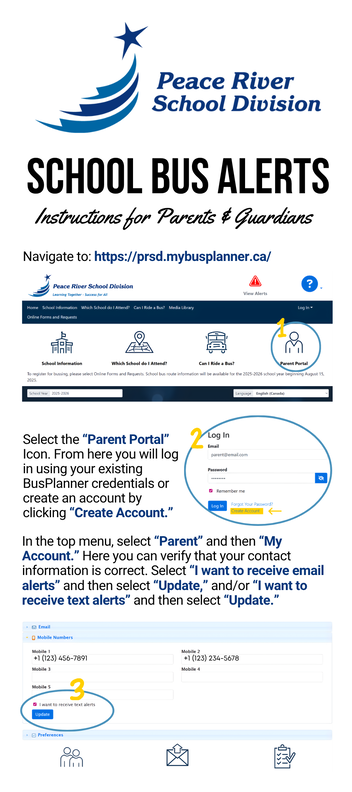
Is my child's privacy protected in the app
Yes, privacy is a priority. The app works securely with our routing database and GPS data to calculate ETAs. The system itself does not store personal data on the bus card. The Chipmunk app only displays the bus location while it is on a route and the secure scan events for safety purposes.
Additionally, the app is not a continuous live feed of the bus route, rather it is set to update every 60 seconds and only displays route information specific to the individual user. This means users cannot access any information about other riders on their student's bus route, and accounts are limited to email addresses registered with the PRSD Transportation department.